Top Gun: 1.0.0a Landing Hotfix
Tired of donating your plane to the ocean after every mission? Last time, we reverse engineered the Top Gun NES ROM to figure out exactly what the heck the game wanted us to do to land (tl;dr: altitude between 100-299, speed between 238-337, heading in an 8 pixel window across the centerline). The plane is still pretty hard to control, though, and the cockpit lacks creature comforts to really tell you why you keep embarrassing yourself. Let’s reverse the full flight physics model and then re-implement the whole mess a little less opaquely (jump to the end to get right to the flying and crashing):
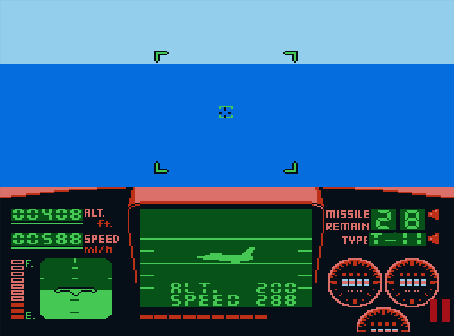
Old and busted 1.0.0
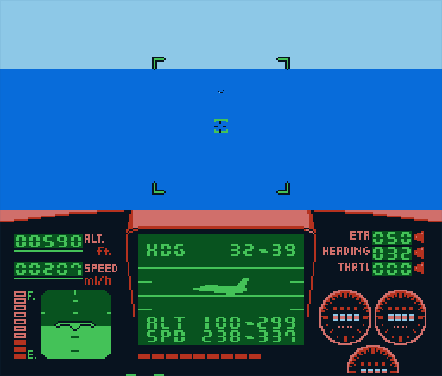
Shiny new 1.0.0a: explicit envelopes for flight parameters and indicators for heading, throttle, and ETA
The physics model
The game ticks at 60Hz and handles input every frame but only updates the altitude and speed every 8 frames. This is the frame-to-frame state it maintains:
class State:
	# Altitude, stored at $3D-$3E.
	# Lose instantly if this falls to 0
	altitude: int

	# Speed, stored at $40-$41.
	# Lose instantly if this falls below 20 (??!!)
	speed: int

	# Pitch, stored at $98.
	# Varies from -32 (nose down) to +32 (nose up)
	pitch: int

	# Throttle, stored at $99.
	# Varies from -5 to +5.
	throttle: int

	# Heading, stored at $FD.
	# Varies from -32 to 32. Must be between 0 and 7 (inclusive)
	# at touchdown.
	heading: int

	# How fast are we ascending or descending?
	# Affected by throttle and also pitch when throttle is non-zero
	climb_rate: int

	# The current frame number
	frame: int
I thought it might be fun to walk through the 6502 assembly for the physics routine, but it’s a pretty mind-numbing labyrinth of tests and branches. For instance, here’s the code that handles the B button (i.e., throttling down):
; Decrement throttle ($FC), saturating at -5. Also decrement
; climb_rate ($9A) (which causes the plane to descend faster),
; saturating at -3.
throttle_down:
    06:B516: SEC
    ; throttle is stored at $99: ranges from -5 to +5.
    ; Load it into A and subtract 1.
    06:B517: LDA $99
    06:B519: SBC #$01

    ; if the new value is positive, skip the range check.
    06:B51B: BPL $B521

    ; store the new throttle value back at $99 if it's not
    ; less than -5.
    06:B51D: CMP #$FB
    06:B51F: BCC $B523
    06:B521: STA $99

    ; Do a similar dance with climb_rate: load it, subtract 1,
    ; store it back if it's in range.
    06:B523: SEC
    06:B524: LDA $9A
    06:B526: SBC #$01
    06:B528: BPL $B54F ; (STA $9A)
    06:B52A: CMP #$FD
    06:B52C: BCC input_done
    06:B52E: STA $9A
    06:B530: BCS input_done
    06:B532: BVS no_throttle_input
I’ll save you the agony of reading through another couple hundred lines of that. Rather, let’s just talk about what the game does at a high level:
- With no input, your plane will lose altitude and speed at a constant rate, regardless of pitch (with speed loss being a little higher)
- Providing positive throttle input increases your speed, negative input decreases your speed
- If your nose is pointed up while you provide positive throttle input, your altitude will increase
- If your nose is pointed down while you provide any throttle input, your altitude will decrease faster than the base rate
- Your plane’s heading and pitch will be jittered occasionally. This is actually a big deal because the window of acceptable headings is pretty narrow
Notice that you can’t adjust your speed and altitude independently – to go up, you must go faster. That’s mostly intuitive and feels vaguely like the region of reversed command, where altitude is controlled by power rather than pitch.
The heading jitter is an absolute underappreciated killer: you have an eight pixel window to be in and the controls are very sensitive (one frame of input = one pixel of movement), all while the game randomly nudges you. On top of that, there’s no active readout or feedback other than the occasional flash of “Left! Left!” in the cockpit.
Below is some python-y pseudo code that’s pretty close to the real thing (it’s missing non-essential
things like computation of the engine whine). For the curious, here’s my
full re-implementation.
For the extra, extra curious, this routine is at memory address 06:B4A0.
def tick(state: State):
	# pitch and heading input is read every frame; both are clamped to the
	# range [-32, 32]
	if left_input:
		state.heading -= 1
	if right_input:
		state.heading += 1
	if up_input:
		state.pitch -= 1
	if down_input:
		state.pitch += 1

	# The first 2 of every 32 frames, apply random jitter to
	# heading and pitch.
	if state.current_frame % 32 < 2:
		state.heading += random.choice([-1, 1])
		state.pitch += random.choice([-1, 1])

	state.heading = clamp(state.heading, -32, 32)
	state.pitch = clamp(state.pitch, -32, 32)

	# throttling down lowers our climb rate, regardless of pitch
	if throttle_down_input:
		state.throttle -= 1
		state.climb_rate -= 1

	# throttling up causes us to ascend if the nose is pointed up,
	# or descend if it's pointed down.
	if throttle_up_input:
		climb_delta_table = [-2, -1, -1, -1, 0, 1, 2]

		# map state.pitch to a number in the range 0-6
		quantized_pitch = 0
		for cutoff in [6, 10, 26, 38, 48, 58]:
			if state.pitch + 32 >= cutoff:
				quantized_pitch += 1

		delta = climb_delta_table[quantized_pitch]
		state.throttle += 1
		state.climb_rate += delta

	state.throttle = clamp(state.throttle, -5, 5)
	state.climb_rate = clamp(state.climb_rate, -3, 7)

	# if no throttle input is given, decay our throttle and climb rate
	# towards zero
	if no_throttle_input and state.current_frame % 4 == 0:
		state.throttle -= sign(state.throttle)
		state.climb_rate -= sign(state.climb_rate)

	# every eight frames, update our speed and altitude. Speed is updated
	# based only on the current throttle. Altitude is updated based on
	# climb_rate that we computed above.
	if state.current_frame % 8 == 0:
		state.speed += state.throttle // 2
		altitude_delta = state.climb_rate // 2
		# every other update, lower the climb rate by one unit?
		if state.current_frame % 16 != 0:
			altitude_delta -= 1
		state.altitude += altitude_delta

	state.current_frame += 1
The reimplementation
Physics model in hand, we have everything we need to re-implement this and make it better:
- Show the actual acceptable ranges of altitude and speed rather than just the midpoint – no more guessing what “Up! Up!” means
- Do the same for heading, which was completely absent in the NES version (I’ve added 32 to the display so it’s always positive)
- The speed, heading, and altitude displays independently flash when they’re in the danger zone
- Add a throttle display too: it’s a little non-obvious that you’re actually doing something otherwise
- Add a countdown timer so the moment of final judgement is less of a jump scare
Play it below or run it fullscreen (works with keyboard, touchscreen, and gamepad controls). Implemented with Lyte2D, the coolest little game engine ever.